
Add a part: photos, details and the final review
A practical walkthrough of the three-step listing form.
In this guide
Before you start
Prepare the actual part photos and reliable vehicle details before starting. New listing details are not saved as a draft when you leave the page. Photos upload when selected, while the listing itself is submitted with the final action.
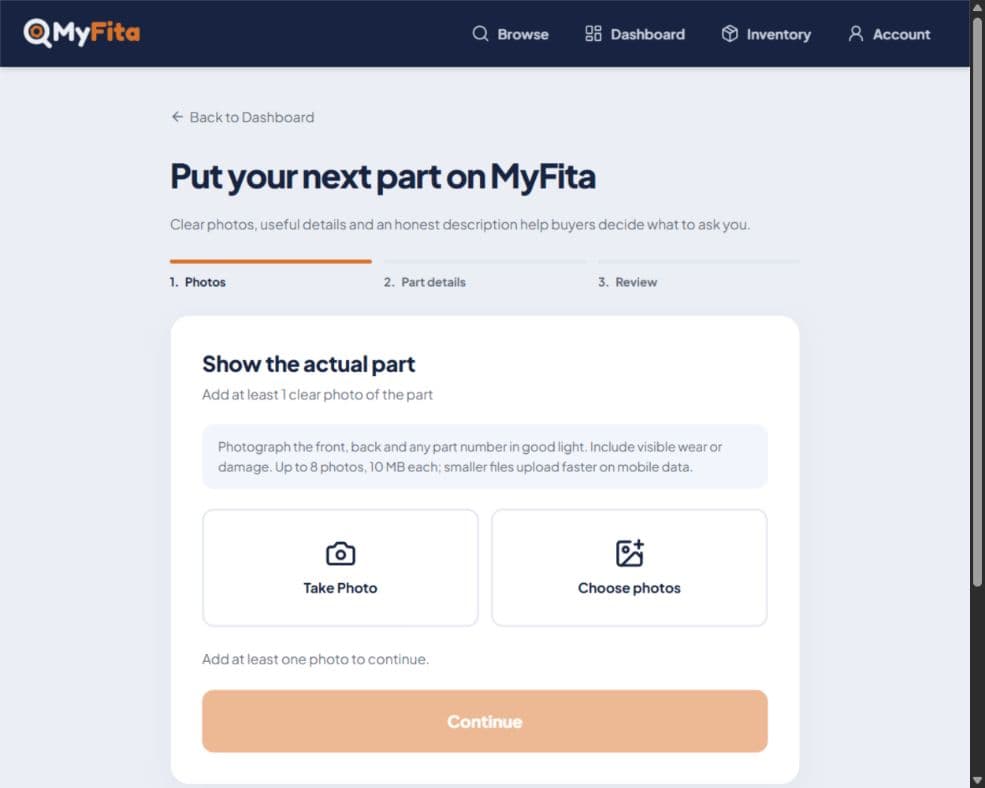
1. Start with photos
From Dashboard choose Add a part, or use Add New Part in Inventory. Take or choose at least one photo. Up to eight photos are allowed, with a 10 MB limit each. Wait for uploads to finish before continuing.
2. Describe the component
Enter a useful part name, an optional part number, relevant categories and condition. Add the vehicles you know it suits. Use Other and the typed field when the make or model is not listed; years are optional.
3. Review the offer
Continue to the review step. Enter a price in Ghana cedis or leave it blank for contact-for-price. Add an honest description of condition, inclusions and any limits, then check the summary.
4. Submit once and check the result
Use the final submission button when everything is correct. Wait for the result and inspect Inventory for the listing and status. Submission does not necessarily mean immediate public visibility.
If upload or submission fails
Read the error before retrying. Check the file limit and connection for uploads. If a submission result is uncertain, check Inventory before trying again to avoid duplicates. Do not remove existing images unless you intend to change the listing.
Ready to try it?
Follow the steps at your own pace. Sign in with the appropriate account when prompted. If you get stuck, Help Center has a route to support.